

Login
Login options
You login to MediCase using your personal username and password. Alternatively, if your organization supports it, you login using Single Sign-On (SSO) - read more in the Single Sign-On section.
Username and password
To login with username and password, go to the login page https://login.medicase.se , enter your username and password and click "Login".
For study users, your username is your email address.
If you are a participating subject in a MediCase study, contact your study site for a username and password.
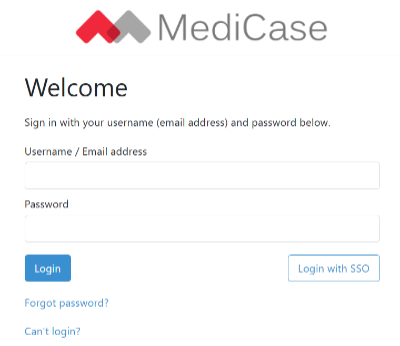
Login by entering your username/email address and password and click 'Login'
2-Step verification
When you verify your login using your 2-step verification method you may choose to check “Remember this device”. If so, MediCase will not ask for your 2-step verification method on that specific device and web browser for 30 days.
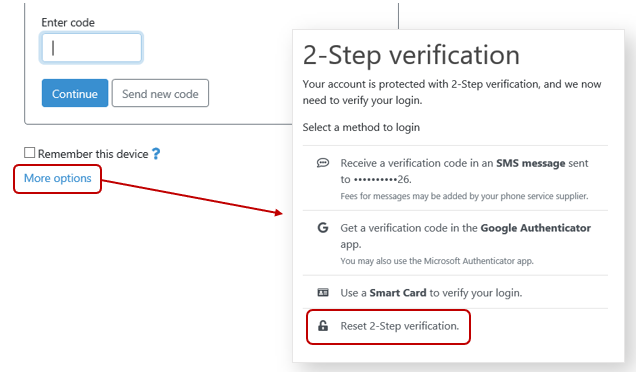
There is also a ”More options” link that you can use if you want to use another verification method than your default method, or if you need help resetting your 2-step verification.
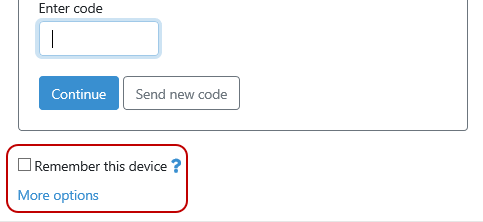
Read more about setting up 2-step verification in the 2-Step verification section.
Single Sign-On
If your organization uses a supported Single Sign-On (SSO) provider and have been given access to MediCase by your organization, you can log in using your existing credentials.
To access the Single Sign-On login page press `Login with SSO`
Entering your email address or your organization's domain will redirect you to your organization's authentication page. Once you are authenticated, you will automatically be logged in to MediCase.
Problems logging in?
Study users
If you are a study user, you log in using your email address as username, and your personal password. If you have forgot your password, follow the instructions at Forgot password?.
If you during the 2-step verification don’t have access to your phone or your smart card that you use to verify your login, MediCase can’t send you reset information to your email address for security reasons. However, we have added a way to reset the 2-step verification. If you request reset a “user manager”, i.e. a user that has permissions to add and manage users in a study you participate in, may help you login to your account and re-configure the 2-step verification. Click “More options” on the 2-step verification login screen and then click “Reset 2-Step verification”.
Participating subject
If you are a subject participating in a MediCase study, contact your study clinic for information about how to login to MediCase.